Request Leave
You can submit leave requests from the New Leave Request dialog box of the Manage Work Schedule screen.
To request leave, complete the following steps:
-
Click
 to open the New Leave Request dialog box.
-
In the
From field, use
 to enter the first day of your requested leave. The default is the current day.
-
In the
To field, use the
to enter the last day of your requested leave. The default is the current day.
-
Click
 after you have entered your total hours for the current request.
After you complete your leave request, your requested leave days pending approval display as red
after you have entered your total hours for the current request.
After you complete your leave request, your requested leave days pending approval display as red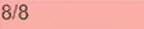 in the Employee Work Schedule Dates table. The first number in the cell is the number of leave hours requested for the day. The second is the total work hours for the day according to the employee's normal work schedule. Days where leave has been approved display as green
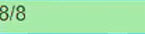 .
.